Permission Matrix
Who can do this:Super AdminDirectorCase ManagerCoordinatorAsst. CoordinatorGrant WriterVolunteer
Goal: See the complete feature-by-feature breakdown of what each role can access in VoTech.
Use the search box below to filter by feature name. Green = full access, Red = no access, Yellow = conditional access with notes.
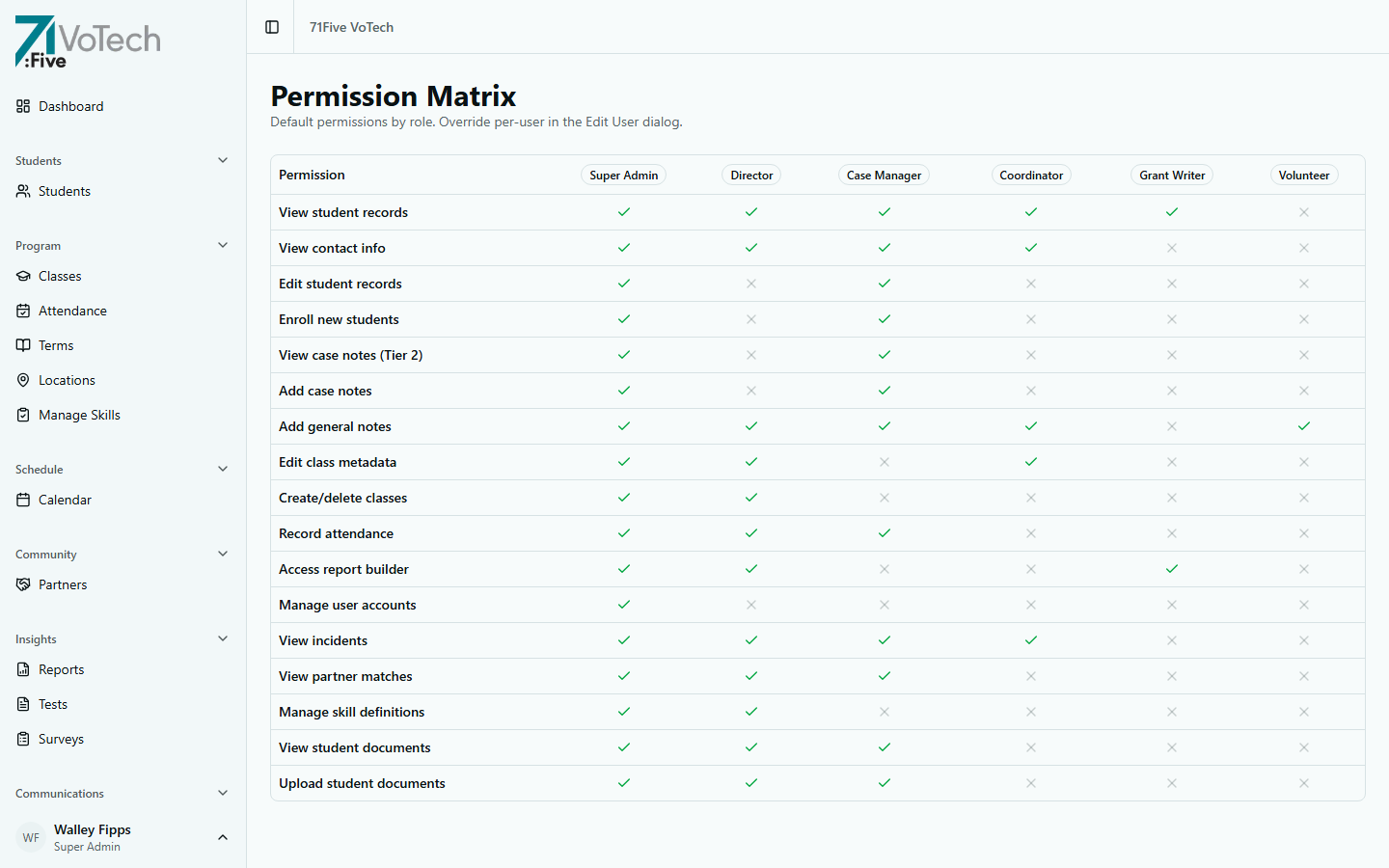
| Feature | Super Admin | Director | Case Manager | Coordinator | Grant Writer | Volunteer |
|---|---|---|---|---|---|---|
| View Dashboard | Full | Full | Location | Location | Read | Limited |
| Enroll Students | Yes | No | Yes | No | No | No |
| Edit Student Info | Yes | No | Yes | No | No | No |
| View Student Roster | All | County | Location | Location | Multi | Location |
| View Identity Section | Yes | Yes | Yes | Yes | Yes | Yes |
| View Contact Info | Yes | Yes | Yes | Yes | No | No |
| View Education/Program | Yes | Yes | Yes | Yes | Yes | No |
| View Living Situation | Yes | Yes | Yes | Yes | Yes | No |
| View Health & Justice | Yes | Yes | Yes | Yes | Yes | No |
| View ACE Data (Tier 2) | Yes | No | Yes | No | No | No |
| View Case Notes (Tier 2) | Yes | No | Yes | No | No | No |
| View SSN (Tier 1) | Yes | No | No | No | No | No |
| Take Attendance | Yes | Yes | Yes | Yes | No | Yes |
| Correct Old Attendance | Yes | No | 72hr | No | No | No |
| Manage Classes | Yes | Yes | Enroll | No | No | No |
| Create Tests/Surveys | Yes | Yes | No | No | No | No |
| Record Skills | Yes | Yes | Yes | Yes | No | No |
| File Incident Reports | Yes | Yes | Yes | Yes | No | No |
| Send Notifications | Yes | Yes | Yes | No | No | No |
| View Messages | Yes | Yes | Yes | Yes | No | No |
| Send Messages | Yes | Yes | Yes | No | No | No |
| View/Upload Documents | Yes | Yes | Yes | No | No | No |
| Delete Documents | Yes | No | No | No | No | No |
| Run Reports | Yes | Yes | No | No | Yes | No |
| Export CSV | Yes | Yes | No | No | Yes | No |
| Manage Users | Yes | No | No | No | No | No |
| View Audit Trail | Yes | No | No | No | No | No |
| Backup & Restore | Yes | No | No | No | No | No |
| Manage Terms/Locations | Yes | Yes | No | No | No | No |
| Community Partners | Yes | Yes | Yes | Yes | Yes | No |
| Follow-Up Tracking | Yes | No | Yes | No | No | No |
| Add Notes | Yes | Yes | Yes | Yes | No | Yes |
Legend: Yes/Full/All = full access (green) | No = no access (red) | Location/County/Multi/72hr/Enroll/Read/Limited = conditional access (yellow)
Understanding Conditional Access
Some cells show a condition instead of "Yes" or "No":
| Value | Meaning |
|---|---|
| Location | Access limited to your assigned location only |
| County | Access limited to your county (Jackson or Josephine) |
| Multi | Access across multiple locations (read-only) |
| 72hr | Can only make changes within 72 hours of the event |
| Enroll | Can enroll students into classes, but can't create or manage the class itself |
| Read | Read-only access — can view but not create or edit |
| Limited | Significantly restricted view (e.g., Volunteer sees Identity only) |
| Full | Complete access to this feature |
| All | Access across all locations (Super Admin) |
Location Scoping
VoTech scopes access by location:
- Super Admin — sees all 3 locations (Medford, Grants Pass, Shady Cove)
- Director — sees all locations in their county
- Jackson County: Medford + Shady Cove
- Josephine County: Grants Pass
- Case Manager, Coordinator, Asst. Coordinator, Volunteer — see their one assigned location
- Grant Writer — sees multiple locations for reporting (read-only)
ℹ️ NOTE:
A user can be assigned to only one location (or one county for Directors). If you need access to a different location, contact a Super Admin to update your assignment.
Data Tier Restrictions
The permission matrix above shows feature access. Data tiers add another layer:
| Tier | Who Can See | Examples |
|---|---|---|
| Tier 1 | Super Admin only | SSN |
| Tier 2 | Case Manager + Super Admin | ACE data, case notes |
| Tier 3 | All authorized staff | Justice, disability, foster care |
| Tier 4 | All authorized staff | Demographics, attendance |
See Data Tier Definitions for the full breakdown.
Related Guides
- Understanding Your Role
- Data Tier Definitions
- Student Detail Page — section-by-section visibility